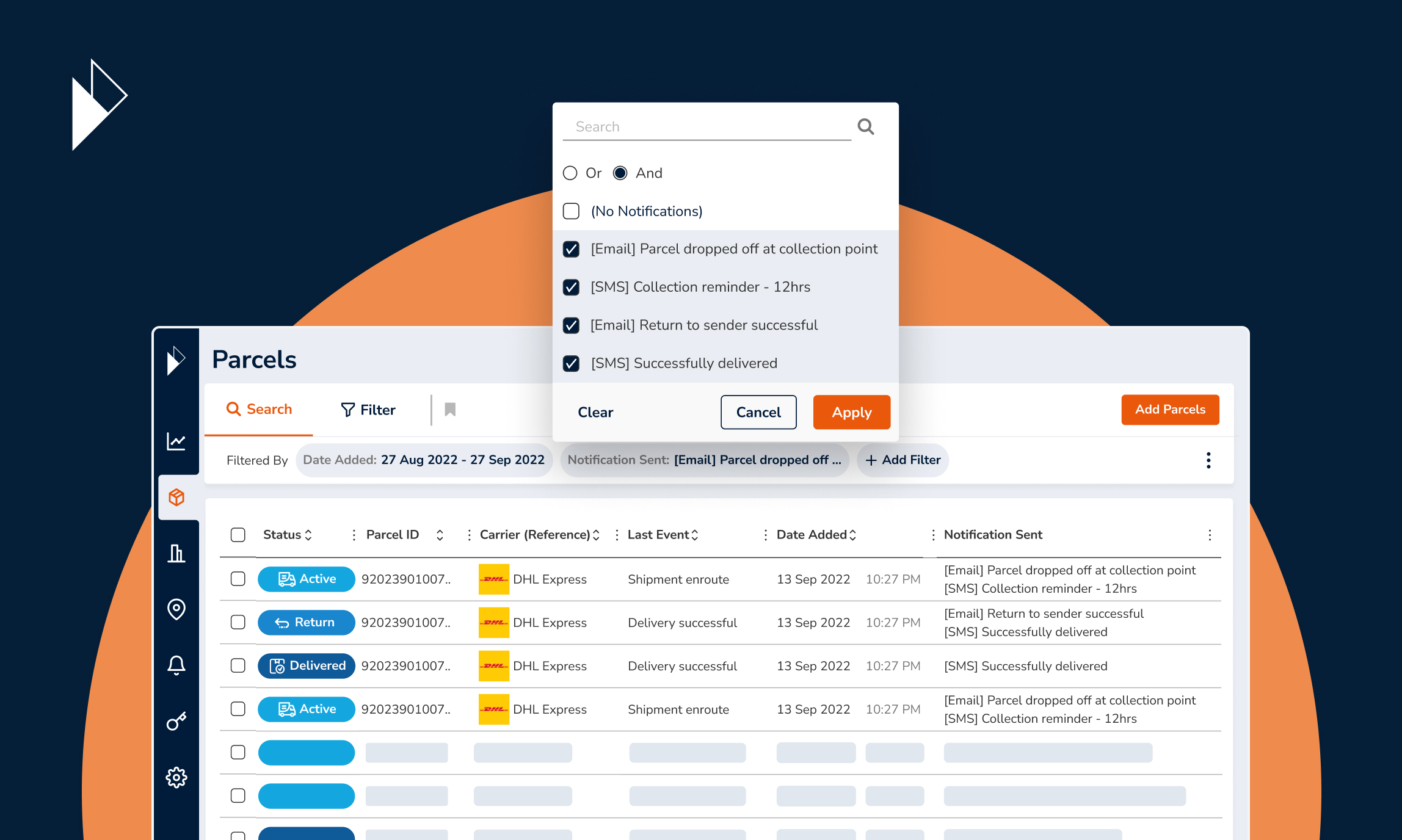
Perfect your notifications strategy with Shipment Notifications Reports
Feb 16, 2023
E-commerce businesses have one major advantage over traditional retailers. They have access to large amounts of data that can be used to make decisions based on evidence instead of intuition or guesswork. Large retailers and marketplaces are already analyzing email data to get the real-time insights needed to improve their sales and marketing efforts.
However, there might be a data source that you might have overlooked–your Shipment Notification data. These numbers tell you much more than just open rates. When you know what you are looking for, you can discover trends that can help you improve email marketing effectiveness or logistics performance.
Some key metrics to look out for are notification performance, the number of notifications sent over time, time customers take to open notifications, and regional notification performance. With Parcel Perform’s intuitive Shipment Notification Reports, these numbers are easy to read.
However, turning these metrics into insights requires understanding how they work. To help you get started, we compiled a quick guide to show how you can use our Shipment Notification Reports feature to improve your e-commerce business.
Making sense of notification performance metrics
Before we delve into insights, it’s crucial to understand what these notification performance metrics are for. With the Parcel Perform delivery experience platform, notifications are sent to inform customers about the status of their orders.
The most common notification triggers would be order confirmation, delivery delay, failed delivery attempt, and successful delivery. With the Parcel Perform platform, however, our customers can create a comprehensive notification strategy using as many as 56 triggers.
1. Optimize notifications strategy for maximum customer engagement
A comprehensive notification strategy comprises multiple updates that optimize the customer experience. These updates are carefully selected to ensure customers get only the updates they need to stay engaged.
However, finding the right updates requires careful strategic adjustments–and that’s where the “Email Notifications Performance Metrics Split by Notifications” chart comes in handy.
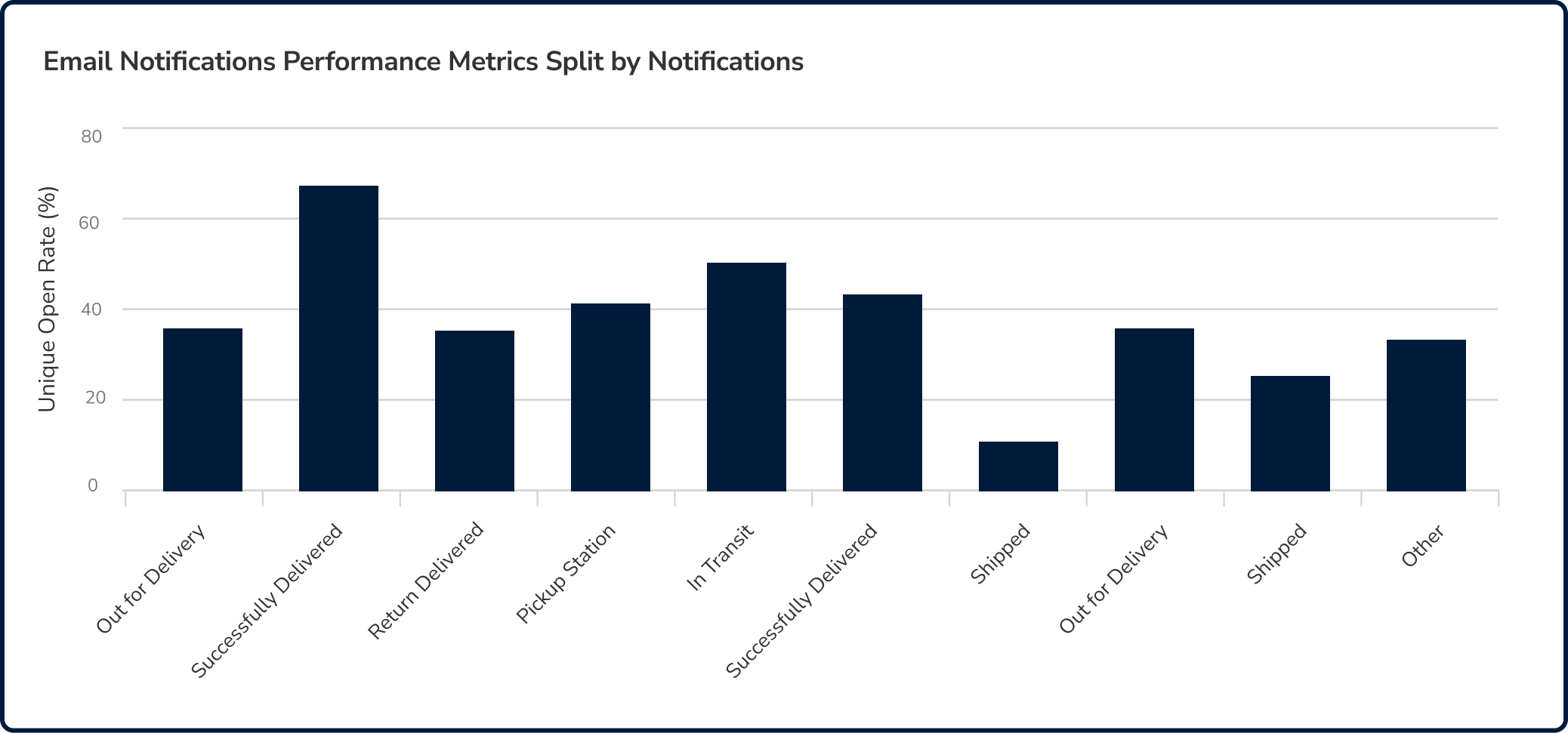
Identify notification trends to optimize your notifications strategy
This standard report shows metrics like open rates, clicked rates, unsubscribe rates, and bounce rates. With just a glance, you can identify the notifications your customers care about the most.
From there, it becomes much easier to tweak and optimize your notifications strategy to include updates that maximizes engagement–and identify the ones that are most suitable for including upselling and cross-selling content.
Some of the questions answered would be:
Which email notifications are most likely to be opened?
Which email notifications are ignored by customers?
Which email notification strategies maximize engagement?
2. Monitor, measure, and improve marketing or logistics performance
When your business sends more notifications, it generally means your sales are increasing. However, a granular view of notifications can reveal inefficiencies or issues that need to be managed.
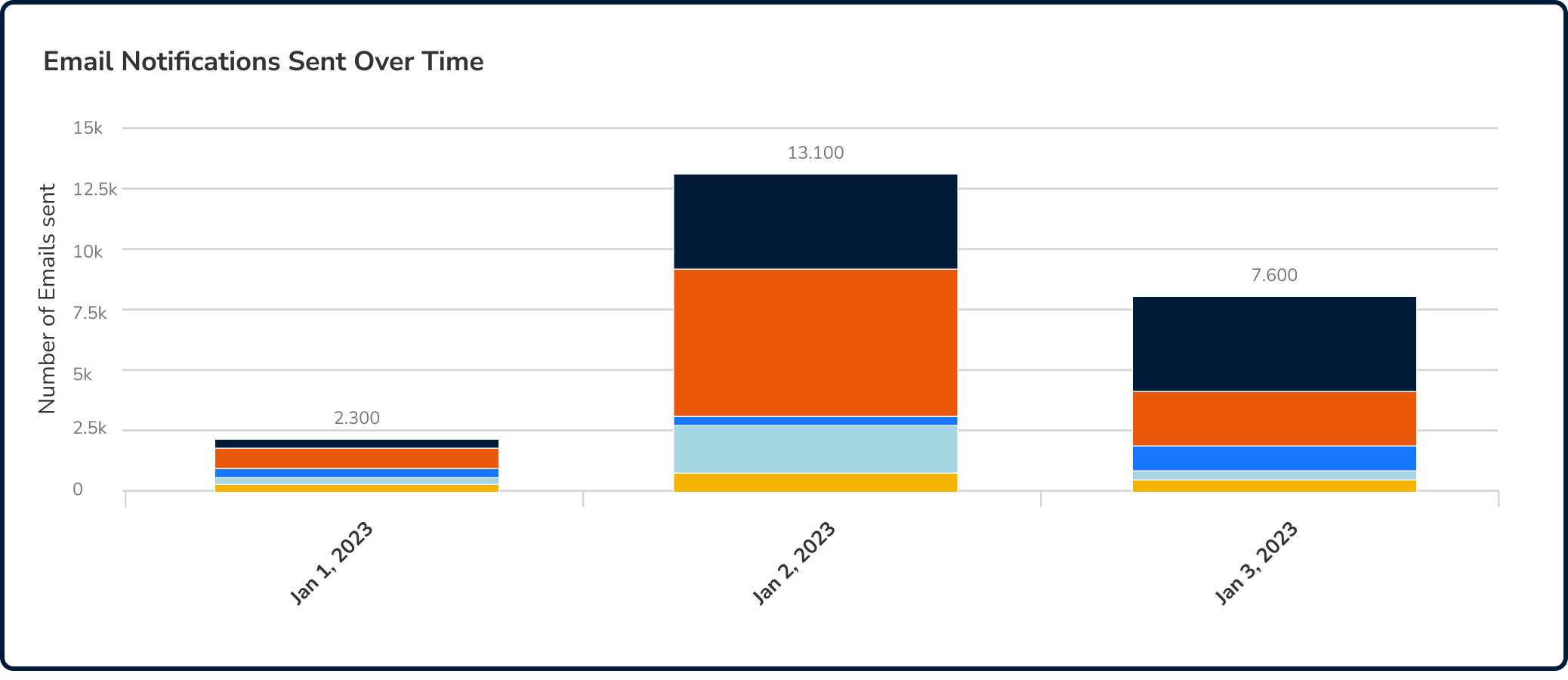
Measure marketing campaigns or reveal disruptions in the delivery process
For example, if you see a spike in delivery delay notifications over two days, there is a good chance that your delivery process is dealing with some disruptions that need to be addressed. From the chart above, you can see that notifications are color-coded. The chart can also be customized to provide the insights you need in real-time.
With this information, your logistics team will always be one step ahead of deliverability issues. At the same time, customer service can use this information to proactively communicate with customers and reassure them before they get frustrated.
Another use case would be to measure the effectiveness of marketing campaigns. At a glance, marketing teams can see if campaigns lead to an increase in sales without having to look at irrelevant data sources.
3. Use consumer insights to send notifications that customers care about
Delivery update notifications typically see open rates as high as 80%. This indicates that your customers want to be kept in the loop regarding order delivery. However, open rates are not enough to reveal deeper insights into customer behavior.
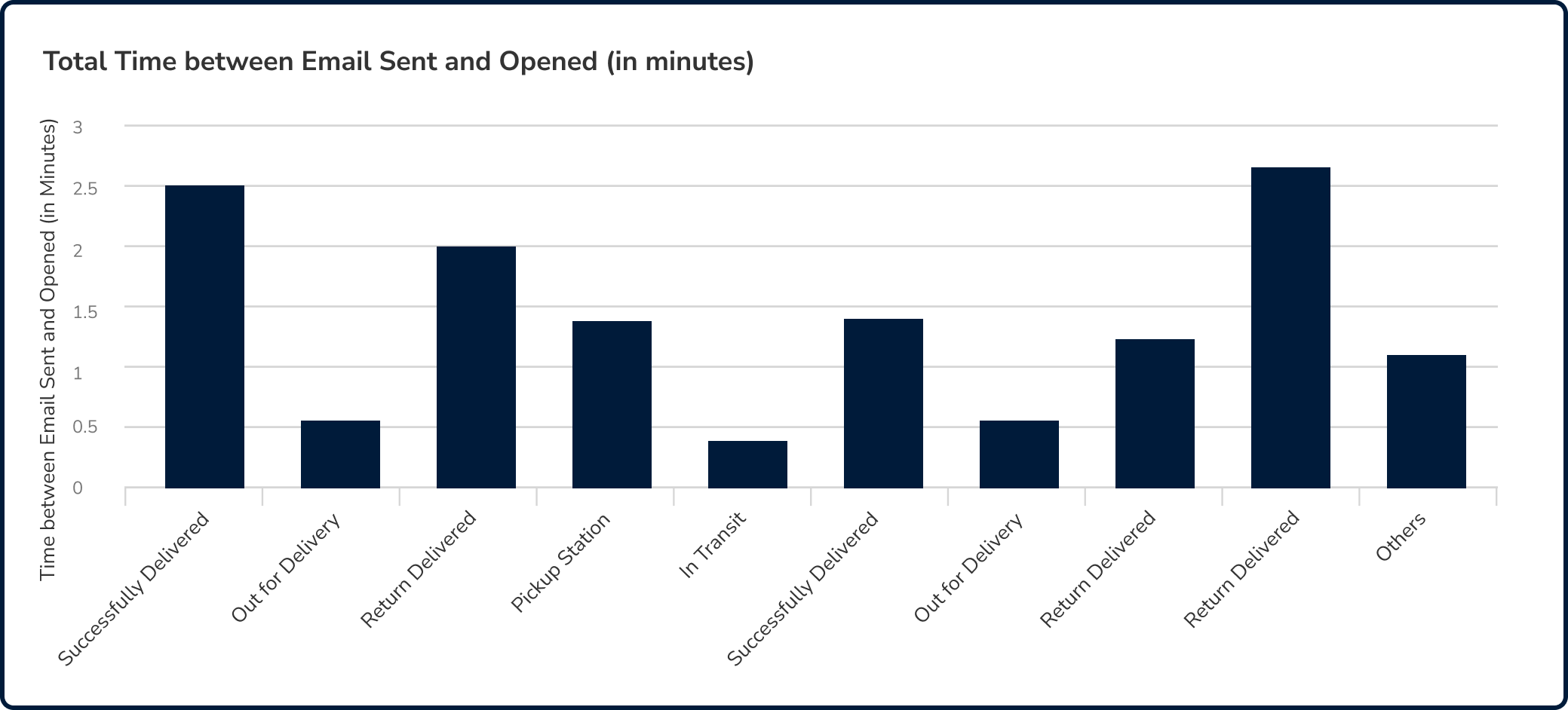
Find out what notifications are important for your customers
“The Total Time between Email Sent and Opened” chart lets you dive deeper into what consumers think. It can reveal the weakest link in your notifications strategy. If customers take a long time to open an update notification, they are most likely ignoring it on purpose.
That could mean that ignored notifications are irrelevant to customers, notifications are being sent at the wrong time, or subject lines and preview text need to be optimized. This is a crucial detail that can be used to further improve your notifications strategy.
To get a clearer picture, you can apply filters and view the chart in 3 ways:
Average
Median
90th Percentile
4. Identify geographic preferences to send highly targeted notification content
Cross-border e-commerce is a massive opportunity for e-commerce businesses. By opening your business to new markets, you can reach new customers and tap into demand for your products. However, success depends on understanding each new market.
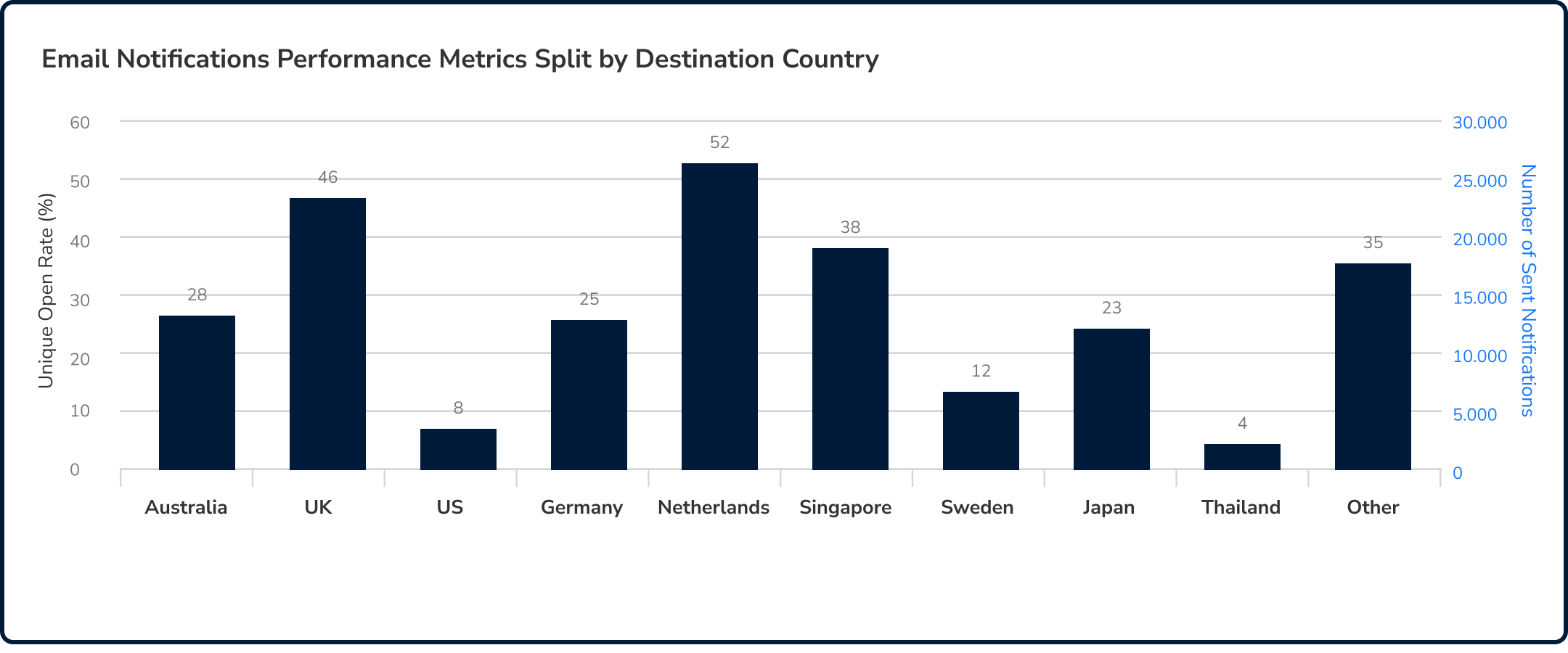
Get a better understanding of customer behavior in various markets
The “Email Notifications Performance Metrics Split by Destination Country” chart allows you to customize effective notification strategies for each market. Having these data allows you to identify trends and how you can improve your notification strategy to increase engagement.
For instance, in the sample chart above, you can see that some countries are not receptive to notifications. That could mean that your notification strategy requires some optimization to increase engagement.
From the same sample chart, you can easily tell that a few countries respond well to your notifications. That could represent an opportunity to launch a marketing campaign through your delivery notifications.
Use data and insights to grow your business
Monitoring notification performance should be an essential practice for your business–especially if you’re looking to grow fast. By regularly monitoring notifications, you can stay one step ahead of trends, and continuously improve your notifications strategy for the greatest impact.
At the same time, you gain powerful customer behavior insights that can help you make data-driven decisions. For marketing and e-commerce teams, this report can help you identify ways to improve engagement, and the best emails to insert upselling or cross-selling opportunities.
Logistics teams, on the other hand, can layer this data with other reports to get a more complete picture of logistics performance. And finally, customer service teams can use data from this report to identify issues, and proactively resolve them or respond much faster to customer queries regarding these issues.
Use Parcel Perform’s notification analytics to improve your business. Fnd out how your e-commerce business can start leveraging delivery update notifications, request for a personalized demo of our platform with one of our e-commerce experts.

You might also like
Overcome these 6 barriers to maximize returns profits
The path to profitable returns is not an easy one. Here are several barriers that e-commerce businesses face.
Dec 14, 2023