
Empower Customer Service For Peak Seasons with Our New Parcel Details Interface
Nov 18, 2020
Last updated on April 12, 2021 to reflect new product feature releases.
Tremendous e-commerce sales growth is expected in 2020’s holiday season. With up to 40-60% of customer service calls being “where is my order” enquiries, retailers who can empower their customer service teams to manage these inquiries effectively can spell the difference between retaining the customer for the long haul or losing them to a competitor.
To empower you for the peak season and future crucial, high-volume sales cycles, we’ve developed a new Parcel Details interface to support your customer service teams to quickly see an overview of all parcels while keeping specific parcel-related information available.
Let us unpack this further in this blog post and help you explore what is possible with these new interface improvements.
Who is this for?
Customer service team members and managers
Logistics managers to view detailed issues of a parcel
Carriers & 3PL managers and business owners
What’s new at a glance?
Empower your customer service teams to serve customers quicker and more efficiently:
We’ve designed a more efficient workflow to help you keep the Parcel Overview in sight while taking a specific look into an individual parcel
Even more data fields to capture more specific information about an order.
You can now attach documents via our API, provide even more clarity to your address to provide even more clarity on recipient, sender, retailer addresses; allowing your customer service to quickly pinpoint an inquiry’s area of concern and address them.
More intuitive UI and visualization of parcel information
: We’ve enhanced the UI for on-time deliveries and incorporated a clearer display of delivery milestones for parcels. Also, if you’re using our Premium Tracking Page, the delivery status icon design and content information will be aligned with your brand’s look and feel in your tracking page. Click each section in the menu to navigate directly to that specific section for quick reference.
New update! Notification history in Parcel Details interface:
We have developed an enhanced notifications segment that allows you to see the notification history,
including email, SMS, and webhook notifications that have been sent for the corresponding parcel. This allows you to resend previous notifications and
helps your team troubleshoot potential questions for pending orders.
View additional guides on our Parcel Overview here.
How to use our new Parcel Details interface to supercharge your customer service processes.
Click on a specific parcel within the Overview to navigate to the new Parcel Details:
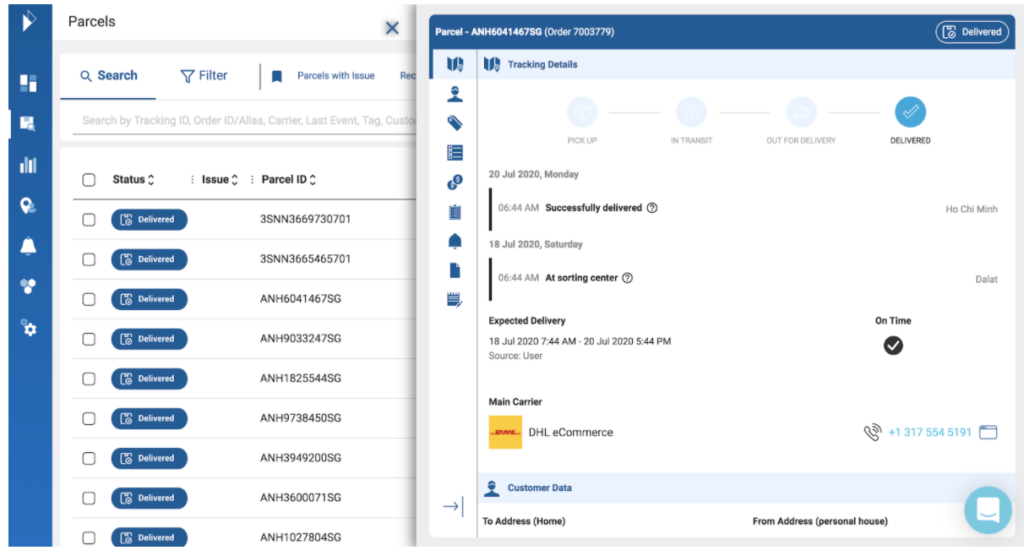
You’ll notice details of a specific parcel now slide out on one corner of the screen. This ensures the Parcel Overview remains visible while you are viewing the details of a single parcel - giving your customer service team a more efficient workflow to navigate through parcels while keeping specific details of the overview visible (for example, looking at delivery status of a parcel or its associated Parcel ID).
From this menu you’ll be able to navigate to different sections of the Parcel Details, depending on your needs. Click each section in the menu to navigate directly to that specific section for quick reference.
Overview of the Parcel Details menu segments
The menu is divided into the following intuitive segments:
Tracking Details:
See all tracking details of the parcel, including current and past issues for quick reference and resolution. If parcels have an issue history, you’ll find more details about the issue type here in the tooltip next to the corresponding delivery event. The logistics carrier attached to this parcel and their contact details can also be found here for quick follow up.
Customer Data:
All customer-related information like delivery addresses (both sender and receiver), order information or any custom fields appear here. You can also add and edit custom fields in this section.
Tags:
Use tags to quickly categorise, sort and filter different parcels within your Parcel Overview. Remember, you can use tags to highlight parcels linked to specific campaigns, sort priority shipment parcels or quickly mark parcels with previous issues for quick follow up. We recommend you set out a consistent logic to define these tags to ensure this function is as useful as possible
Note: Tags once saved, cannot be removed.
Additional Details:
All information that doesn’t fall into the above sections like timestamps, shipping information go here.
Track & analyse notifications by parcel:
Coming up: We’re developing an enhancement here to this segment enabling you to see per parcel exactly who received a notification and which channel the notification came from for instance through email or SMS. Stay tuned for more updates!
Documents & File Attachments:
See all documents attached to this parcel e.g. custom clearance forms. Additional address-details fields are also available to provide even more clarity and specificity on recipient, sender or retailer addresses.
Notes:
Finally, you can add or remove any notes attached to the parcel here.
You’ll also notice that we’ve improved the UI to only show relevant data fields within parcel information to enable your team to navigate through the Parcel Details menu and highlight relevant points with ease.
Deliver proactive, timely customer service with the help of our new Parcel Details
We’re ready to help with questions you may have and can’t wait to get you started or view other materials on our Parcel Overview.
Switch to our new parcel details interface using the notification banner on top of our platform interface. Speak to our team or your key account manager and we’ll be able to share how our Parcel Details interface can support your customer service teams for the months ahead.
You might also like

From hassle to profit: The blueprint of a seamless returns flow
Follow our returns blueprint to start working on a successful returns strategy.
Nov 15, 2023