How to use SMS Delivery Notifications In Your Communications
Apr 13, 2020
Did you know the first SMS notification sent in December 1992 to a single phone contained only 2 words? It was "Merry Christmas". The humble SMS notification may seem rudimentary next to its comparably modern counterparts like branded emails, WhatsApp messages, and webhook notifications, but don't underestimate the channel's power.
SMS delivery notifications command a formidable engagement rate
SMS cuts through the noise: SMSes have a whopping 98% open rate, 5x that of email newsletters.
Exceptional response time: 90% of SMSes are read in <3 minutes and
Deemed less spammy: 75% of consumers are fine with receiving SMS messages from brands (assuming they opted in).
Which teams can leverage notifications?
E-commerce managers looking for a high-performing communication channel for their brand and want to improve delivery notification engagement rates
Customer service managers who want to provide delivery status updates proactively to customers
When to incorporate SMS notifications in your delivery communication strategy?
This form of communication drives tremendous engagement from your customers and is well-positioned to delight your customers. SMSes have a 209% higher response rate than the phone, email, or Facebook.
Ensure delivery success: a well-timed SMS when parcels are out for delivery reduces occurrences of failed delivery.
Communicate critical or time-sensitive information: remind customers to pick up their parcels from self-collection locations
Drive customer action: alert customers to update important information eg. delivery address
Engage customers after checkout and drive repeat sales: efficient, opt-in only platform to disseminate marketing messages to your customers
Manage customer expectations on delivery dates: communicate to the customer if there are changes to the date of arrival.
How to trigger SMS delivery notifications that are timely & relevant?
Here’s a step-by-step guide for SMS configuration using Parcel Perform:
Step 1: Click on Add Notification from the Dashboard to configure your new SMS notification
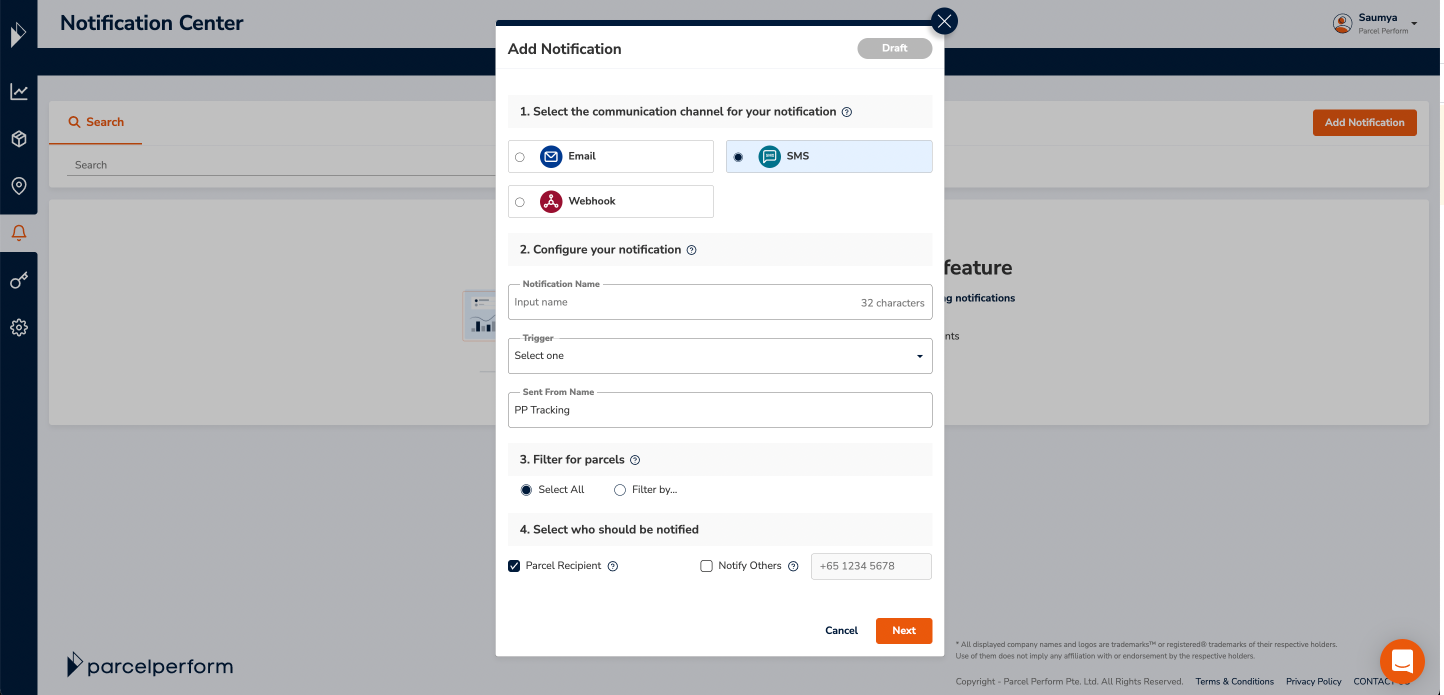
Step 2: Give a new notification a name and apply it to the delivery triggerStep 3: Configure sent-from name (max 11 characters). This includes letters from the GSM-7 character set, numerical digits and spaces.Step 4: Similar to Email or Webhook notifications, you can apply the configured SMS notification to a specific carrier, tracking experience or tag.Step 5: Notify customers by selecting Parcel Recipient, or update internal teams via the "Notify Others" option Step 6: Once you've finished configuring the SMS, hit Next to configure the content of your SMS.
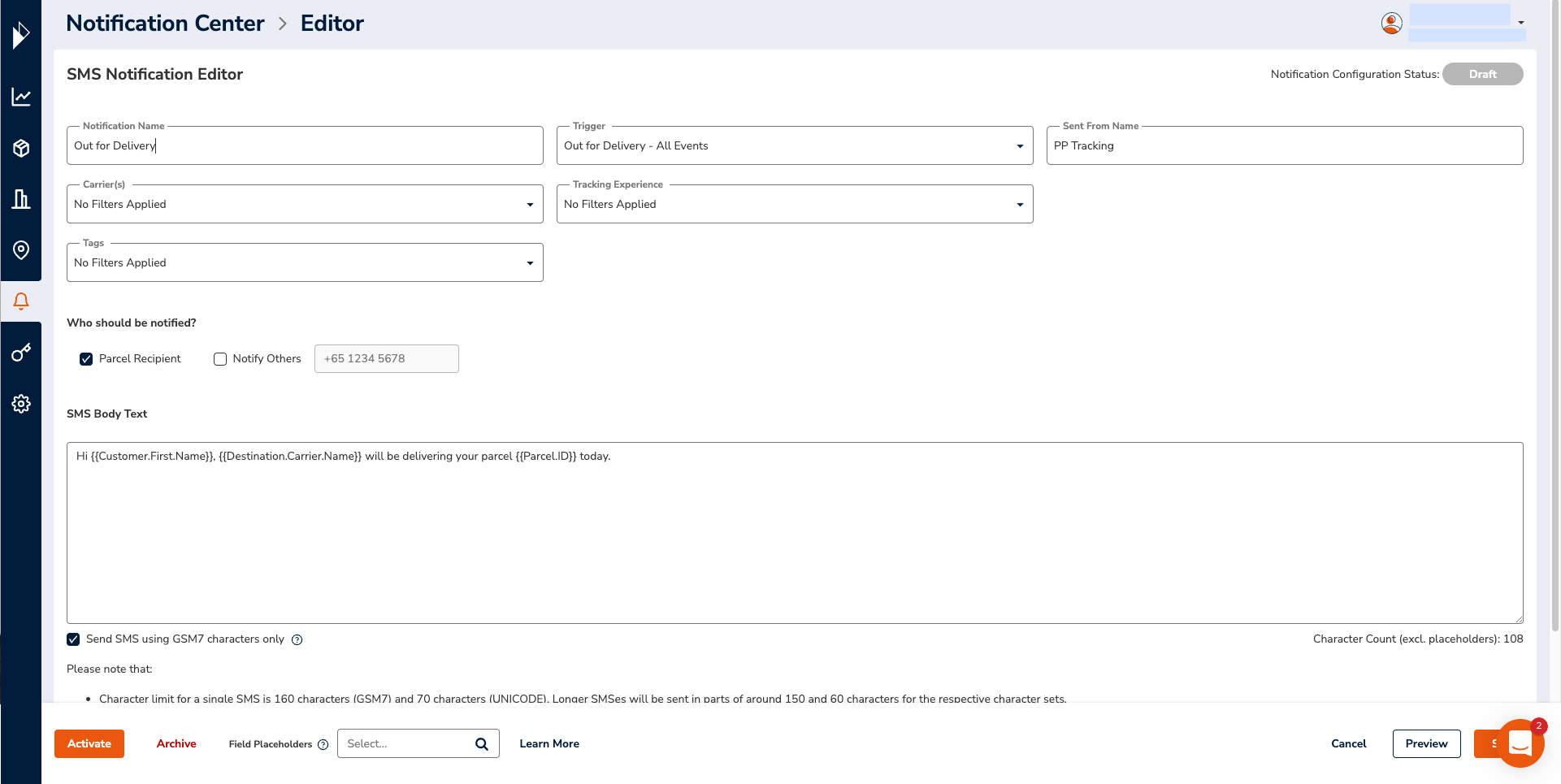
Points to note while configuring the body text of your SMS delivery notification:
Field Placeholders automatically display shipment data to personalize the content of your SMS notifications - make use of them!
There are two types of character encoding - GSM7 and UNICODE. This impacts the maximum number of characters for a single SMS.
The maximum length for a single SMS for GSM7 is 160 characters and 70 characters for UNICODE. SMSes longer than these limits will be sent in parts. We have a character count on the bottom right, but note the final character count will differ due to text lengths when field placeholders are used.
You can choose to send SMSes using GSM-7 characters only. With this option checked, all UNICODE characters will be replaced with a “?” symbol.
An SMS allows up to 160 characters from the GSM-7 character set which includes all Latin characters A-Z, digits 0-9, plus a few special characters. Unicode handles any known character but also takes up more SMS space than -bit binary code.
Special characters may not render correctly because of telco restrictions in certain destination countries. We recommend previewing SMSes before activating and keeping to commonly used characters while crafting your message.
You must have pre-approved send
er IDs and SMS templates to send SMSes. Reach out to us if you need help with setting this up.
Step 7: Preview the SMS before activating your campaign! Input a phone number with the country code to send a test version of the SMS

Ready to launch the SMS delivery notifications campaign? Follow this checklist:
Does your parcel data uploaded to the Parcel Perform platform include the destination number and country code?
Have you decided which character set (GSM7 or UNICODE) to use?
Have you checked that SMS body text length?
Do your special characters (if any) preview correctly in your SMS? Send yourself a test SMS!
Once completed, ‘Send’ the campaign when you’re ready to go.
Performance optimization made easy within the Notification Centre

You can select from reporting performance across an aggregation of all your parcels or view the performance of individual notification campaigns.
Analyze the total number of notifications sent from your Parcel Perform account, across all channels in the last 14 days.
View engagement metrics like open, clicked, and bounced rates for your email and SMS notifications.
Get an overview of all configured notifications in your Parcel Perform account.
Re-send notifications if the customer requests for it.
Tailor your SMS campaign to suit your product category and business
The higher value of the item, the more your customers will expect prompt, accurate notifications on their order status. Luxury retailers use SMS notifications to track the movement of their deliveries and send active updates to customers.
Giving your customers the opportunity to respond via call-back or request to be called by customer service also opens a two-way, transparent conversation with customers to resolve urgent queries nearer the delivery time.
Customers have high expectations when receiving furniture or bulky items. Often customers need to be home to receive the item so SMS notifications are fantastic to cut through the noise and get immediate attention from your customers nearer to the delivery date. Send a notification the day before the delivery date to confirm the timing of arrival to provide an enhanced experience.
Harness the power of SMS delivery notifications for your e-commerce business
SMS is a powerful channel to transform your post-purchase customer experience from good to great. Tap on this powerful engagement channel and leverage the right tools to ensure the effectiveness of your communication strategy.Delight your customers at high-priority contact points.
Leverage this engagement channel in your post-purchase communications strategy today. Ready to get started? Talk to our experts or your existing key account manager to explore the benefits of a top-notch SMS strategy.
You might also like
Ensure your delivery and returns experience is ready for peak season
Here's how to reduce the cost of returns while laying the foundation for a seamless delivery and returns process.
Oct 19, 2023